


 Setări
 Livrare rapidă
 Livrare gratuită
 Incoterms
 Tipuri de plată


 Produs Marketplace

How Hardware Gets Hacked (Part 3): Adopting the Attacker Mindset
2026-04-20 | By Nathan Jones
Introduction
After describing the MITRE eCTF competition and our updated project, we’ll begin with the process of attacking the insecure example. Attacks always begin with an “information gathering” step, so in this article, we’ll discuss what information attackers look for and where they can often find it. By the end of this article, you’ll be able to produce a portfolio for an electronic device with information about how it works and where its potential vulnerabilities lie. Most importantly, you’ll begin to train yourself to spot those vulnerabilities in other designs and source code (especially yours!). Let’s get started!
Challenge question!
Why do you think attackers bother with reconnaissance at all? Why not just start trying random exploits?
What do you think changes when you have good information about your target? What’s an example of a “good” piece of information that you think an attacker would find highly valuable?
Answer these questions to yourself before you continue reading!
The importance of reconnaissance
As any skilled spy, thief, or all-around “bad guy” knows, the first step of any job is to “case the joint”; that is, to collect a lot of information about the people and places pertinent to the “job”.
 "The humans bring the food through the front door weekly. If we target the source, we can--SQUIRREL!!!"
Successful heists begin by getting the answers to key questions, such as:
- “What’s their normal daily routine?”,
- “How do contractors access the building?”, and
- “Where does the trash go when it’s picked up?”
Even if the answers aren’t particularly interesting (i.e., they don’t identify an easily exploitable vulnerability), every answer learned builds a person’s understanding of the “target”, increasing the chances that the answer to the next question will expose a vulnerability. Good reconnaissance enables an attacker to aim for specific vulnerabilities that can be exploited; without it, they’re merely guessing.
Reconnaissance objectives
In general, we’re looking for any information that can enable a successful attack, including the payoffs we hope to achieve after a successful attack. Put another way:

Find possible payoffs
Before we can “case the joint,” we have to identify a “joint” to “case”! In other words, there must be something of value to be gained by attacking our target to justify an attack in the first place.
An attacker’s desired payoffs might include:
- making the device run attacker-controlled firmware,
- extracting protected user data, or
- extracting secret keys.
These might be acquired for the purposes of:
- unlocking pay-to-play features,
- customizing device behavior,
- selling secret or protected data to another interested party,
- gaining access to a network or physical location (like a car!) that they would otherwise be denied, or
- defaming the manufacturer.
Only some of these payoffs may be applicable for a given device and a given attacker. Pay attention to all possible payoffs during your initial reconnaissance, though. Later, you can prioritize just the ones that seem to have a higher value while being protected by more easily exploitable vulnerabilities.
In the case of the eCTF, the payoff we’re chasing is clear: read or extract flags from opposing teams’ designs.
Review the overall design
Next, we need to ask the relatively boring question “How does this device normally work?” We can’t exploit abnormal behavior if we don’t know what the device thinks is abnormal in the first place, after all!
Think of this step as looking for the information that would be given to you if you were to have just joined the design team and needed to know how the device worked.
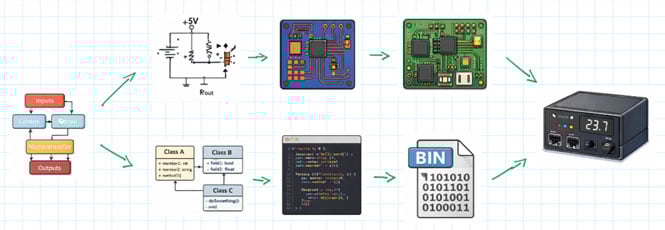
For an electronic device, we might ask:
- What’s the circuit schematic?
- What are the major components in the hardware design?
- What’s the PCB layout look like?
- What external connections are on the PCB (UART, JTAG, test points, etc.)?
- How does a user operate the device?
- What are the failure modes?
- Are there any interfaces or modes that a technician would use (e.g., debug mode/port, means of OTA updates, maintenance codes that allow for upgraded access, etc.)?
- What’s the source code?
- How was the source code built and flashed onto the MCU?
- How does the firmware work?
In addition to being good background information about a device, knowing the answers to these questions is critical when identifying possible vulnerabilities, which we’ll discuss in the next sections. For instance, knowing the device runs on 3.3V may not be particularly enlightening, but knowing how that supply voltage is generated and stabilized might be necessary for successfully conducting a voltage glitching attack (more about that in a later article).
Although we already have a deep understanding of our system from the first two articles in this series, there is still information that would be useful to have, and that might lead to a vulnerability (or help us eliminate one from our design). For instance:
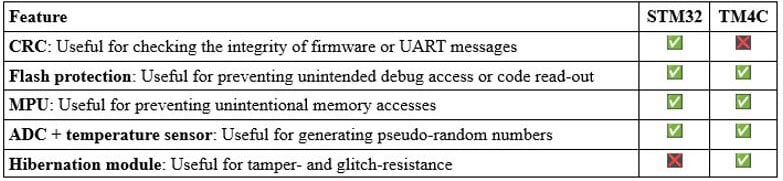
- Does the TM4C/STM32 have any security-related peripherals like TRNGs, AES engines, etc.?
- The eCTF flags on the TM4C are stored in EEPROM; is that on-chip or on-board?
Challenge question!
What are the answers to those questions? (Solutions are at the end of the blog.)
Challenge question!
Can you think of any additional questions to ask about our system that would be good to know? (A few ideas are at the end of the blog.)
List attacker-controlled inputs
As you’re learning how the target works, pay particular attention to anything an attacker has control over, be it electrical, logical, or environmental. For most electronic devices, for instance, an attacker can control:
- everything on the PCB, including:
- the power supplies,
- the clock signals,
- test points,
- boot pins,
- strap or configuration resistors/jumpers,
- traces that connect on-board parts (which can be cut or new wires added),
- off-board connectors or wires that go to other peripherals, debug adapters, etc.
- all user inputs (buttons, screens, dials, switches, etc.),
- communications between devices, and
- environmental conditions.
If users are allowed to modify or configure the firmware that gets loaded onto their device, then attackers have the ability to control those inputs as well, which may give them some level of control over how the firmware is built and loaded.
Among many other options, attackers could then use these inputs to:
- control the values that a microcontroller reads from its external sensors,
- cause a microcontroller to operate outside its temperature range,
- change, delay, replay, or fabricate UART/SPI/I2C messages from external devices,
- desolder an external memory chip and read out the contents or inject attacker-controlled data on the memory bus lines,
- cause system errors or force the system into invalid states by applying user input too quickly or incorrectly, or
- cause the device to enter a bootloader or service/maintenance mode that’s normally inaccessible to the end user.
Keep in mind that none of these are necessarily useful attacks. Most are merely permanent artifacts of an electronic device (all of them have a power supply of some kind!), and highly secure designs know how to stay secure in the face of everything an attacker could potentially control. But they do form the basis for any future attacks. Most importantly, thinking about this puts us in the frame of mind for asking a key question: “What are the assumptions that were made by the designers about device operation that can be subverted?” Every successful attack begins by subverting an assumption made by the designers.
Identify potential vulnerabilities
The last piece to our proverbial puzzle (and possibly the most fun and interesting) is identifying a system’s vulnerabilities. We’ve already identified (or are in the process of identifying) what inputs an attacker can control and what payoffs they want to achieve. A system’s vulnerabilities are exactly how attackers can turn one into the other.
We’ll separate these vulnerabilities into two categories: “Known bugs” and “Interesting oddities”.
Known bugs
“Known bugs” are high-value vulnerabilities because they reflect code that has known errors or defects. These are things like
- not checking the return value of malloc or
- writing into a buffer without an upper bound.
The designer assumes in these cases (perhaps implicitly) that certain actions or states are impossible to reach.
- “Why would malloc fail? We have tons of heap space.”
- “Why would len ever be larger than sizeof(msg)? Every message sent by every other device sets len correctly.”
Unfortunately, of course, such “impossible” behaviors happen all the time, especially when a person is trying to make them happen. What’s more, if they were to when they happen, they nearly always put the device into a state that was completely unexpected by the designers, states which often lead to successful exploitations.
 https://imgflip.com/i/aiommu
For example, reading from memory without an upper-bound potentially gives an attacker a way to read arbitrarily-long sections of memory.
Example
uint8_t *buf = malloc(len);
How could it be exploited?
Attacker causes len to get an overly large value
Example
memcpy(buf, input, len);
How could it be exploited?
Code subsequently writes past the end of buf, possibly from parts of memory past the end of input that reveal device secrets.
This is, more or less, exactly how the infamous “Heartbleed” exploitation worked.
 https://xkcd.com/1354/
You can probably think of a number of programming bugs that you watch for all the time, along the lines of “failed to check the return value of malloc” or “operated on a buffer/array without an upper limit”.
Challenge question!
What are they? What other checks would go on your list of “known bugs”?
To help you build that list, consider these categories:
- Buffer and memory operations
- Pointer dereferences and null checks
- Return value validation
- State machine transitions
- Type conversions and integer overflows
Which of these do you think are most common in the code you've seen?
You can find a more complete list of known bugs, what MITRE calls their “common weakness enumeration” or CWE, at cwe.mitre.org. This is a great list to become familiar with, since keeping these weaknesses out of your code doesn’t just help make it more secure, but more robust as well. (There are even hardware CWEs!)
Normal linters such as Cppcheck or clang-tidy are excellent for checking if any CWEs exist in a codebase (either yours or your target’s!). You can also use tools designed for this specific task, such as cwe_checker.
MITRE also keeps a “common vulnerabilities enumeration” or CVE list at www.cve.org. As opposed to what the CWE would show you (general classes of bugs and coding patterns), the CVE list keeps track of specific bugs in specific programs or libraries. You can use tools like cve-bin-tool to see if any part of the code you’re attacking (or writing!) has a known CVE.
Interesting oddities
“Interesting oddities” are patterns that aren’t inherently wrong, only suspect. They represent design choices that fall short of ensuring certain things to be true (leaving open the door that they might not be true) or that indicate the designer didn’t do their “due diligence”.
These are things like:
- A missing default label in a switch statement
switch(color)
{
    case RED:
    break;
    case GREEN:
    break;
    case BLUE:
    break;
}
- An error that’s ignored or silently suppressed
if (sensor_read(&value) != OK){ // should never happen }
process(*value);
- A lack of verification of outside information, either messages or sensor values
float temp = getTemp();
setMotorSpeed(temp);  // What if getTemp returns -1 on error?
                      // Or a value indicating it’s +999 deg C?
- A single conditional before performing critical actions
if (password_ok) authenticated = true;
- Any race condition or unprotected critical section
config.version = NEW_VERSION;
write_flash(&config);
// Attacker could trigger an interrupt to modify config
// or cause a device reset here, before valid is set
config.valid = true;
write_flash(&config);
In each case, it’s possible to confuse a program about its operating state, opening the door to a possible attack.
- switch(color) is supposed to do something based on color, but if an attacker can set color to a value other than RED, GREEN, or BLUE, the program doesn’t do anything. Worse, the program has no idea that it hasn’t done anything and continues operating as if it had.
- if (password_ok) is supposed to keep out anybody who doesn’t have the correct password, but what if our conditional didn’t execute correctly 100% of the time? In safety-critical systems, there might be three or more independent computers that are all checking this value and coming to an agreement about whether authenticated should be true. In our devices, all it might take is an attacker to cause password_ok to get a garbled, non-zero value (0x4A7F390B evaluates to true!) for this check to “fail open”.
You can begin to identify these oddities by starting to ask yourself, “What would break if the universe were malicious instead of polite?” This type of question requires a person to go beyond the mindset of a junior developer (“How do I get my program to work?”) and even beyond the mindset of a senior developer (“How do I prevent accidental faults or edge cases from disrupting my program?”), to the mindset of a security professional: “How do I prevent even intentional faults from disrupting my program?” (or, from the attacker’s point of view: “How can I disrupt this program by causing an unanticipated fault?”).
Junior developer
- Just gets it working
- Knows enough to do the thing they want
- Assumes perfect operating conditions
- Stays on the “happy path”

Senior developer
- Prevents accidental faults
- Knows enough to avoid the thing they don’t want
- Assumes the device is being used (mostly) correctly
- Entertains the “drunken happy path”

Security professional
- Prevents intentional faults
- Knows enough to prove the thing they don’t want can’t happen
- Anticipates the device being used incorrectly on purpose
- Lives on the “road to hell”

There are a lot more code patterns that could go in this category, but in the interest of brevity, I’ll save those for future articles in which we discuss where they actually show up in our evolving design, how to attack them, and then how to defend against those attacks.
Challenge question!
What else would you add to your list of “interesting oddities”? (A few ideas are at the end of the blog.)
Where to find design information
There are many places to gain enough information for mounting a successful attack. As you read through this section, ask yourself, “What information is my company/system (or the company/system that I’m trying to attack) leaking that could be used to later attack it?”
Challenge question!
Before continuing this next section, take 10 minutes to search for information about a project you've worked on or a product you already own—check GitHub, the company website, documentation, conference talks, etc. What information that could help an attacker is publicly available? What surprised you about how much (or how little) was out there?
The manufacturer’s website
This is likely the first and most obvious place to look for information to support our reconnaissance. Beyond just having the user manual (which also likely has a “troubleshooting” section that you can scour for information about failure and recovery modes!), the manufacturer’s website/public Git repositories may also have (depending on how open the design is):
- software tools for interacting with the product,
- training material about how to use and service the product (for customers or technicians),
- information about patent or FCC filings (parts of which can be accessed by searching on https://fccid.io/ or https://ppubs.uspto.gov/basic/),
- (Fun fact! Patent filings were used to defeat the Cisco root of trust in 2020 and to expose backdoors in x86 CPUs in 2018!!)
- binary firmware images,
- schematics,
- PCB layouts,
- source code, or
- build instructions.
But don’t just stop at the product manufacturer’s webpage! Once you know the components that are on the PCB, the product pages for those particular ICs can be just as helpful. For instance, if we’ve identified the main processor, its product page might reveal:
- datasheets,
- reference manuals,
- errata, and
- application notes or example software for commonly needed functions such as bootloading, over-the-air updates, encryption, etc.
Maintenance/repair support
In the fight for “right to repair”, many individuals have taken it upon themselves to show the world how to take apart and repair their electronic devices. Although these individuals may not have been motivated by hardware security, their tutorials can often shed important light on how devices work (i.e., where they’re vulnerable) or even provide their own software tools for interacting with or modifying the electronic device.
Additionally, an internet search may reveal publicly available forum posts or even support tickets issued to the manufacturer in which people describe how to debug and fix the electronic device.
Reverse-engineering projects and security assessments
Of course, some individuals (such as yourself!) are motivated by more than merely repairing and maintaining their devices. You may find, in your internet searching, individuals who have already conducted some research, reverse-engineering, or even hardware attacks (successful or not!) on your electronic device. These can include:
- teardown videos,
- open-source clones of existing devices,
- “modding” tutorials, or
- academic papers or conference proceedings discussing a device’s vulnerabilities and possible or demonstrated attacks.
In particular, keep an eye out for interesting and related talks at security-focused conferences such as Hardwear.io, DEFCON, or Black Hat.
Interrogating the device itself
Don’t forget that you have the ultimate source of information right in your hands: the device itself! Interacting with the device (such as pressing buttons you’re not supposed to press to see what the device does) can reveal information about how it operates and what vulnerabilities it might have. If/when you open up the device and can inspect its circuitry, you can also:
- identify specific part numbers,
- identify jumpers, strap resistors, or solder pads that control device configuration or boot mode,
- probe the circuit and any connectors for interesting signals, as might come from a debug/programming port or a debug console that’s only supposed to be available for repair technicians, or
- reverse-engineer the circuit yourself.
In fact, sometimes it’s not the actual signal that reveals critical information, but the timing. Slight differences in how long it takes a debug console to return an “Access denied” message could be enough to conduct a timing attack, revealing the password orders of magnitude faster than brute-force alone (more about that in a later article).
Conclusion
Challenge question!
What are three things you want to remember about this article?
Answer them to yourself (or, better yet, record them in a notebook or text document) and then continue reading.
Conducting a thorough reconnaissance is an important first step in beginning to attack a target. An insufficient reconnaissance effort means that attacks are untargeted and may never work at all; a thorough reconnaissance means that attacks are targeted to the inputs which the attacker can most easily control to most easily disrupt a part of the software or hardware design that will give the attacker their desired payoff.
Information can be gathered from many different sources. Although having source code is ideal (and can be reverse-engineered in some cases), product information is also leaked through support channels, compliance paperwork, and repair manuals.
A good way to frame your information gathering is through the lens of the device’s design documents. As you uncover the device’s block diagram, source code, or schematic, make special notes of
- good payoffs,
- things an attacker can control, and
- places in the design where an assumption the designers made can be violated, causing unintended behaviors.
“Known bugs”, such as not checking a function’s return value, is a big class of possible vulnerabilities, exactly because they assume things that can be violated by the user or the universe by accident. In contrast, “Interesting oddities” are design patterns that are probably safe from normal operating conditions, but can be forced into unintended behaviors by an attacker who’s maliciously controlling the inputs. These are the attack seeds that we’ll use in later articles to expose (and then protect!) our design. Remember: every successful exploit comes from a mismatch between what the designer believed to be true and what the attacker can actually make true.
If you’ve made it this far, thanks for reading and happy hacking!
Solutions
Does the TM4C/STM32 have any security-related peripherals?
In short, no, neither do; at least, not in the traditional sense of having an AES or TRNG (true random number generator) peripheral. There are, however, some peripherals on each that could be useful for defending our embedded system.
The eCTF flags are stored in EEPROM; is that on-chip or on-board?
For the TM4C123G, it’s on-chip. The TM4C123G has a 2 kB on-chip EEPROM, and there is no external EEPROM on the development board (see the schematic here). As discussed in the last article, though, I chose to store those flags in flash for the Nucleo-F411RE, since it has no EEPROM at all.
Additional questions to ask about our system
- Is the device internally clocked or externally clocked?
- What could happen during a power brownout, clock failure, reset storms, etc.?
- At what optimization level was the binary built?
- Was stack protection included in the binary?
- What is the memory layout of code, globals, stack, and heap?
- Are assertions or exceptions being used?
- How does the system handle partial or erroneous serial messages?
- Where are keys stored?
- Who wrote the program for the device? What’s their programming style?
- Were any libraries used or appnotes followed?
- Does the code have any TODOs or interesting comments?
- What were the design team’s priorities: performance over security? Simplicity over correctness?
More interesting oddities
- Code comments such as “Should never happen” or “Assume valid input”
- Message (or binary image) with no CRC/checksum/authentication
- Missing error state (for FSM)
- Development features (logging, primarily) left in production image (even if they “can’t possibly be re-enabled”)
- Non-atomic operations
- Assertions that are compiled out for production
- Brown-out detector not set, or set too low

















 România